Bringing GenAI To Financial Planning Workflows
Incorporated Gen AI into the workflow of a financial planner in Oracle’s Enterprise Performance Management (EPM) platform
Tools Used: Figma, Confluence, Jira
Interaction Design, Financial Planning, Prototyping, Design Systems

About the project
Financial planners need to understand gaps between planned and actual performance, but this often involves manual data gathering across multiple systems. This slows down decision-making and shifts focus away from analysis.
My Role & Team
Role: UX & Visual Designer
Team: 5 (1 Product Manager, 2 UX Designers,
2 Product Developers)
Duration: June 2024 - Sept 2024
Problem Statement
Identifying the root cause of discrepancies is time-consuming, requiring data collection from tools like Oracle EPM, ERP systems, and dashboards, followed by manual consolidation.
Challenge
Integrate Gen AI into existing workflows in a way that is simple, reliable, and useful for expert users.
Business Goal
Use Generative AI to help planners:
-
Quickly identify root causes
-
Run scenario simulations
-
Get actionable recommendations
Outcome
-
60–80% reduction in manual effort
-
70–90% faster insights (within 5–10 minutes)
-
50–70% fewer interactions (1–2 AI queries)
-
~30–40% better task completion
-
Increased user confidence and independence
Worked in Agile sprints with close collaboration across product, design, and engineering. Used research, journey mapping, ideation, prototyping, and testing to design and validate the AI experience.
Project Kick-off
Before starting, I focused on understanding the problem space and aligning with the team on clear goals. I aimed to uncover
1) The stakeholders’ expectations from integrating Gen AI into the product
2) The reason behind introducing this feature
3) The core problem we were trying to solve for financial planners
4) why users would actually find this capability valuable
Measuring Success
Before designing anything, the team aligned on what success actually meant for this feature. We measured it across three levels of user engagement.
Adoption — Did the planner use Ask Oracle at least once? For example, Simone opens her dashboard, sees a revenue gap, and runs her first AI query instead of opening a spreadsheet.
Activation — Did the planner complete a full analysis using AI? This means she didn't just ask one question — she followed through: got the root cause, drilled into contributing factors like Commercial Vehicles, and ran a what-if scenario. This is where real value kicks in.
Deep Usage — Did Ask Oracle become part of her regular workflow? She's no longer exporting data into spreadsheets at all. She comes to the dashboard, asks the AI, and acts on the insight — consistently, every planning cycle.
We focused specifically on activation, because a planner who completed one full AI-assisted analysis cycle was far more likely to keep using it and abandon the manual process entirely. One query wasn't enough to change behaviour — but completing the full loop was.
We used three measurements to help determine success.
Reduction in Time to Insight
The primary metric. Before Ask Oracle, identifying a root cause took hours or even days. After, the goal was under 10 minutes. This directly measured whether the AI was actually saving planners meaningful time or just adding noise to their workflow.
Usability Testing with Pilot Users
A qualitative measure. A group of financial planners were given a real task: "Q3 revenue is underperforming. Find out why and recommend a course of action." We measured whether they could complete it using Ask Oracle, how long it took, and whether they trusted the AI's output enough to act on it. The goal was successful task completion with minimal confusion and no need to fall back to spreadsheets.
Competitor Experience Scorecard
We compared Ask Oracle against AI features in competing enterprise financial tools. Not just feature-by-feature, but experience quality was our AI more contextual, more transparent, easier to trust? The goal was to close the most critical experience gaps, especially around showing source data and keeping the AI embedded in the workflow rather than feeling like a separate chatbot bolted on.
Design Process
I followed a structured design process: starting with empathizing, then defining user personas, moving into ideation and prototyping, and finally testing to validate the experience.

1. Empathising with the users
Qualitative Research
To design a trustworthy Gen AI solution, we conducted user research to understand planners’ workflows and challenges.
-
Method: Interviews and contextual inquiry, observing planners working with financial data to uncover pain points, current analysis methods, and expectations from AI. We also explored workflows, constraints, and success metrics.
-
Audience: Experienced financial planners who handle complex data and make critical financial decisions.

Questions Asked
-
Which tasks in your workflow are repetitive or time-consuming?
-
How comfortable are you with AI suggesting insights or automating calculations?
-
What makes you trust or distrust an AI-generated recommendation?
-
How should AI present insights without overwhelming you or breaking your workflow?
Outcomes:
-
Users preferred user-initiated AI to maintain control.
-
Insights must be contextual and connected to the dashboard to be actionable.
-
Transparency and explainability were critical for trust.
-
Simplified, plain-language summaries and key drivers improved usability.
These insights directly shaped the AI panels, interaction design, and output presentation, balancing automation with user control and trust.
Competitive Analysis
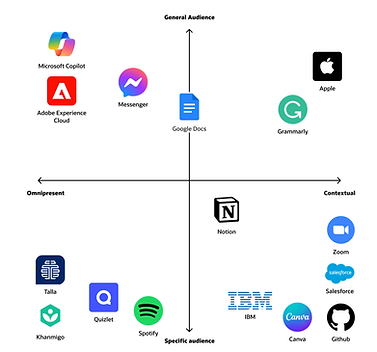
I looked into over 15 products and their AI Assistants. I then summarized each AI experience and categorized them in order to be able to properly compare them to our use case and to each other.
Omnipresent: the product’s AI assistant is meant to be used throughout the application.
Contextual: the AI is only is revealed within a particular context of the application.
General audience: all users of the application would benefit from the AI assistant
Specific audience: the AI is directed towards a subset of users.
Insights
Insights #1

Omnipresent AI assistants are generally in the form of chat bots because its uses are more general.
Insights #2
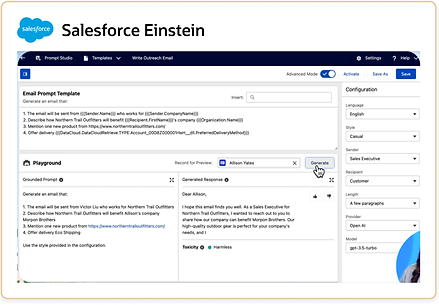
AI assistants with specific use cases and specific audiences are in the form of input/output boxes.
Insights #3

Prompt suggestions are displayed to help the user understand how the AI assistant is intended to be used.
Insights #4

AI editing tools can directly insert generated content whereas more general AI tools cannot.
2. Defining The Goals
Problem Statement
When financial planners see a gap between planned and actual performance, identifying the cause is complex and time-consuming. It requires manually gathering data from multiple systems like Oracle EPM, ERP, and dashboards.
This data is often exported and combined in spreadsheets, involving tool-switching, filtering, and calculations. As a result, planners spend more time collecting data than actually analyzing and making decisions.
As a financial planner, I need to use Gen AI to quickly identify the causes of discrepancies between plan and actuals, so I know what to investigate.
I also need to simulate scenarios and understand their impact to recommend the best course of action.
User Persona
Based on research insights, I created a persona of a financial analyst at an automobile manufacturing company. She is an expert user, comfortable navigating data and requiring minimal guidance.

I was able to break down the steps a financial planner takes into key stages:
-
Discover — The user becomes aware of discrepancies.
-
Learn — The user understands causation behind a discrepancy.
-
Explore — The user works with data to determine potential solutions.
-
Take action & Monitor — The user works with stakeholders to act according to an insight.
I then created a decision tree to identify key actions at each stage, helping simplify interactions and design a more efficient way for users to analyze and explore data.

3. Ideating Ideas
How Might We?
After defining the problem, we conducted a “How Might We” brainstorming session with product and tech teams to generate multiple solution ideas, balancing creativity with feasibility within timeline and technical constraints.
How Might We Formula


User Flow
After we picked the most promising ideas, I mapped out how users would move through the system to complete their tasks. I created a user flow to show step by step how a financial planner would interact with the system.

Leveraging Gen AI to…
Learn — help users quickly analyze data and understand the causes driving a discrepancy between a financial plan and predicted actual.
Explore — rapidly create different scenarios and understand their impact.
4. Design Exploration
Design Exploration 1: Chat Bot VS. Input/Output Box
My first design exploration integrated a chat bot into the user flow because this was an extremely relevant pattern in my research.
In this exploration, the user wants to understand why the variance is high in this chart, so she asks the AI assistant which can be accessed globally. This opens a chat panel where the user can ask about the data on the page.
This concept was quickly discarded for a few reasons. The first is that according to my research, chat bots are most useful when their use cases are more general. However, my research suggested that for specific use cases, such as financial planning, input/output boxes are much more successful patterns. Another takeaway is that this chat bot doesn’t really feel connected to the page, which is a huge drawback for our use case where the user is constantly asking questions about the information on the page.

Design Exploration 2: Ready Only Pages
A question I had while designing was how to handle read-only pages versus pages we were modifying. The dashboard page is intended to be read-only, so I explored this option of asking questions about the content on the page in a page-level magic box, which then opened an insight panel for the AI generated response. From here, the user could expand the data in a dynamic tab and ask further questions.
The idea here was that the user would be able to see the full page on the left while interacting with the response in the right panel. However, we ultimately felt that this interaction didn't fully justify the space the panel took.

Design Exploration 3: Object-level magic boxes
Within our explorations of read-only pages versus pages intended to be modified, a key distinction I explored was page level magic boxes versus object level magic boxes.
Here, the idea was that the user wanted to run a what if analysis on this data set, which is an action that modifies the page, so they would be able to click into the data visualization and add scenarios right there in situ.
However, we realized that specifically for pages dedicated to running what-if predictions, the visualizations on the page would all be related to the same data. This made it counterintuitive for the user to click into specific data sets and ask object-level questions since the questions inherently were about all the data on the page.

Design Exploration 4: Page-level magic boxes
This differs from a page-level magic box, which is demonstrated in this exploration.
Here, the user would interact with the data by dragging an empty canvas into the page, prompting the search box at the top of the page, which would then fill the empty canvas in response.
As I continued exploring the best patterns, I realized that specifically for pages dedicated to running what-if predictions, the visualizations on the page would all be related to the same data. This made it counterintuitive for the user to click into specific data sets and ask object-level questions since the questions inherently were about all the data on the page. From these explorations, we were able to narrow that pages dedicated to expanding 1 data set would benefit more from page-level magic boxes.

5. Final Designs
User Journey: Learn
In this flow, Simone, a financial analyst, returns from vacation and opens the daily flash forecast to find Q3 profit falling short of plan due to a revenue gap. Using the embedded Ask Oracle component directly within the data visualization, she asks clarifying questions about the shortfall and receives AI-generated insights with transparent data sources. As she drills down into the contributing factors, Commercial Vehicles in this case, the AI dynamically expands the analysis, helping her uncover that an over-forecasting bias caused the variance and enabling her to act on the findings within minutes instead of days.

User Journey: Explore
In this stage, Simone moves from understanding why the gap exists to exploring how to close it. She asks the AI for recommendations to meet her revenue target, fully guiding the interaction herself. The AI responds with potential strategies and opens a dynamic tab where she can test what-if scenarios directly in the interface.
Since she's adjusting a single data source, this uses a page-level magic box that lets her add or edit scenarios inline without breaking focus. Curious about marketing's impact, Simone runs a goal-seeking analysis to see how much additional ad spend it would take to reach plan. The AI calculates roughly $350M, which she saves and shares with her team to discuss next steps.

Full Walkthrough
Challenges Faced
-
One of the main challenges in this project was balancing automation with user control. Financial planners are experienced, so if AI takes too much control, they lose trust. But if it does too little, it doesn’t save any time. We solved this by making the AI user-initiated planners ask questions when they need insights, and the AI responds without interrupting the workflow.
-
Another challenge was avoiding the generic chatbot problem. A simple chatbot would give answers disconnected from the actual dashboards, which isn’t helpful. So we designed contextual AI panels embedded directly in the workflow, making sure insights are always relevant to the data the user is viewing.
-
Building trust in AI outputs was also critical, because financial decisions are high-stakes. We addressed this by showing the source data behind every insight, allowing users to verify the AI’s reasoning.
-
Finally, we had to handle complex financial data without overwhelming users. Dashboards are dense, and it’s easy to get lost. We simplified AI outputs into key drivers, plain-language summaries, and actionable insights, so users could quickly understand the data and make decisions efficiently.”
KPIs Used to Measure Success
1. Time to Insight
This measured how long it takes a user to identify the root cause of a discrepancy.
-
Before the solution: Users often spent hours or even days gathering data and analyzing it.
-
After introducing AI: The goal was to reduce analysis time to a few minutes.
2. Reduction in Manual Effort
This measured how many manual steps were eliminated.
-
Before the solution: Users switched between multiple tools, Exported data, Joined data in spreadsheets
-
After introducing AI: AI could summarize drivers directly from the data.
Success was measured by a 60–80% reduction in manual analysis steps.
3. Workflow Efficiency
We measured how many clicks, filters, and dashboard navigations were required to get an answer.
Success meant reducing the process from 10–15 steps to 1–2 AI queries.
4. Task Completion Rate
We evaluated whether users could successfully:
-
Identify variance drivers
-
Understand key insights
-
Run scenario analyses
An improvement in task completion rate indicated the system was easier to use.
Key Takeaways
One of the biggest takeaways from this project was understanding that AI is most valuable when it assists users rather than replacing them. Financial planners are experts in their domain, so the goal was not to automate their decision-making but to help them reach insights faster. Designing the AI as a supportive assistant that users can interact with when needed proved to be more effective than creating a fully automated system.
Another important learning was the significance of context in enterprise AI products. Generic AI responses are not very useful in complex tools. The insights become meaningful only when the AI understands the specific data and context the user is working with. Embedding AI directly within the workflow made the experience far more useful and relevant.
This project also highlighted the importance of building trust in AI-driven systems. Since financial decisions involve high stakes, users need transparency in how insights are generated. Providing clear explanations and showing the source data helped improve confidence in the system.
Finally, I learned that good UX design plays a critical role in making advanced technology usable. Even the most powerful AI capability can fail if it is not integrated thoughtfully into the user’s workflow. Keeping the interaction simple, contextual, and non-intrusive ensured that the feature added real value to the users’ daily work.