A Renowned Mauritian Bank (NDA)
Simplifying online foreign currency transfers for Bank Corporate Clients internationally
Product Design | Digital Transformation
(Note: I have omitted all the confidential information, in order to adhere to my Non-Disclosure Agreement)

About the project
The bank aimed to simplify foreign currency transfers by automating manual initiation and approval processes, reducing errors and improving efficiency for corporate clients.
Team
Role: UX & Visual Designer
Team: 6 (Including me, 2 Junior Designer's, 1 Project Manager, 4 Engineers)
Duration: Nov 2021 - June 2022
Business Goal
-
Enable quick, secure international payments
-
Reduce manual effort and errors
-
Support mobile approvals for executives
-
Increase digital banking adoption
-
Reduce customer support calls
Outcome
-
20% increase in new internet banking users within a year
-
89% transactions automated, reducing manual effort
-
Faster approvals through mobile access anytime, anywhere
Roles & Responsibilities
-
Led end-to-end design in a small UX UI team
-
Created wireframes and high-fidelity mockups
-
Built and maintained the design system
-
Developed interactive prototypes
-
Conducted design quality assurance
-
Coordinated with developers for accurate implementation
Problem Statement
Payment initiators faced repetitive tasks, and approvers struggled to authorize on the go, causing delays and inefficiencies in corporate payments.
Project Kick-off
Before starting the project, I focused on understanding the problem space and aligning with the team on the goals. My aim was to gather the right context before moving into design so that the solutions would address real user pain points. At this stage, I focused on understanding:
-
The stakeholders’ expectations from redesigning the corporate payment system.
-
The reason behind improving the current payment initiation and approval workflows.
-
The core problems faced by corporate users, including initiators and approvers.
-
Why these improvements would be valuable to users and the bank’s business.
-
How success would be measured at the end of the project.
To get the answer of the above questions I reviewed:
-
Existing workflows and approval processes.
-
Customer feedback tickets from corporate clients.
And, this helped me map out the current user journeys, identify pain points, and understand the vision for the new corporate banking platform.
Setting KPIs / Success Metrics
On the basis on historical data, benchmarks, and expected improvements after the redesign, PM defined the below success metrics for the team
-
Transaction Automation: Target 85% of payments processed automatically without bank staff intervention.
-
Operational Efficiency: Reduce payment initiation errors by 40% through improved validation and autofill.
-
Approval Efficiency: Reduce payment approval time by 50% through mobile and bulk approvals.
-
Digital Adoption: Increase corporate digital transaction usage by 25%.
These KPIs provided a clear benchmark to measure success once the project was complete and helped guide design decisions throughout the project.
Design Process
I followed a structured design process: starting with empathizing and conducting affinity mapping, then defining user personas, moving into ideation with card sorting, creating user flows and prototypes, and finally testing to validate the experience.

1. Empathising with the users
Qualitative Research
Understand corporate users’ needs, challenges, and workflows before defining solutions.
-
User Interviews: Remote Zoom sessions with 5–7 users (finance executives, accountants, CFOs, directors) across Mauritius to capture diverse perspectives.
-
Shadowing & Observations: Monitored users interacting with the current system to identify workflow delays and usability issues.
-
Analytical Data: Reviewed transaction logs, error reports, and usage analytics to uncover patterns in transactions, errors, and workflow times.

Questions Asked
For Payment Initiators:
-
How do you initiate payments today?
-
Which steps feel repetitive or time-consuming?
-
What challenges do you face when entering beneficiary details or amounts?
-
How do you track the payment status after submission?
For Payment Approvers:
-
How do you currently review and approve payments?
-
Do system limitations cause delays in approvals?
-
How often do you need to approve payments while traveling?
-
What would make the approval process faster and easier?
Outcomes:
For Payment Initiator
-
Should be able to Initiate a payment to a new and existing beneficiary
-
Should be able to repeat a saved/favorite transaction
For Payment Approver
-
Should be able to keep a check on the account summary
-
Should be able to check the transaction status dashboard
-
Should be able to check Notifications
2. Defining The Goals
Affinity Mapping
I did affinity mapping to cluster user insights and spot common pain points, which helped me define a clear problem statement, user stories and priorities before designing.


Problem Statement
Research revealed MCB’s corporate clients had slow, manual international payment workflows. The solution aimed to streamline the process for initiators and approvers.
1. Payment Initiators
Manual Entries Reduce Productivity & Increase Errors: Data Analytics showed, The payment initiator spends 22% of the time on repetitive tasks like finding the most frequent transactions, entering the name of a saved beneficiary, amount to be transferred etc which leads to poor productivity and increases human errors as a result of which they are not able to concentrate on high priority tasks.

Previous Design
2. Payment Approvers
Legacy Software Lacked Modern Integrations: Payment approvers needed the ability to authorize payments on the go, but the existing platform was obsolete, non-responsive, and could not support modern integrations. This caused delays, customer dissatisfaction, and impacted the bank’s credibility.

Previous Design
User Persona
Payment Initiators & Payment Approvers
After defining the problem statement, I created user personas based on the patterns and insights I discovered. This helped me better understand my users’ goals, needs, and pain points before moving on to designing solutions.

This link will take you to an another tab
3. Ideating Ideas
Card Sorting & User Flow
First, I conducted a card sorting exercise with users to understand how they naturally group content and what terminology makes the most sense to them. Using the insights from this exercise, I then created the user flows, mapping out the steps users would take to complete key tasks. This approach ensured that the navigation and interactions aligned with users’ expectations, making the experience intuitive and seamless.


User Flow
I re-designed the experience once the initiator selects "Foreign Currency Transfer"


Solution Proposed
Designing a new "Make an international" Payment Landing Page
Payment Initiator
4. Design Exploration
Designing a new "Make an international" payment landing page
The goal of the new landing page was to provide customers with quick access to three main functionalities
-
Initiate a payment to an existing beneficiary
-
Initiate a payment to a new beneficiary
-
Repeating a saved/favorite transaction
The design criteria for this page was to have a conversational tone of voice in the labels

Why did they not work?
Repetition in labels like – Beneficiary Name, ID, Bank name etc confused the customer as there was no visual hierarchy in the content displayed.
The design did not have a primary call to action
As per our testing "Pay a new beneficiary" was the most used feature and it did not stand out in this design

5. Visual Design
Scenario 1
Initiate a transfer to an existing or new beneficiary
Problem
Smith says “I have to search for previously saved beneficiaries & transactions everytime I log into the Internet Banking system which is quite redundant & consumes alot of my time”
Solution
We created a new landing page, and provided quick access to the frequently used functionalities like Paying an existing beneficiary, Repeating a saved transaction.

Scenario 2
Entering details of the beneficiary
Problem
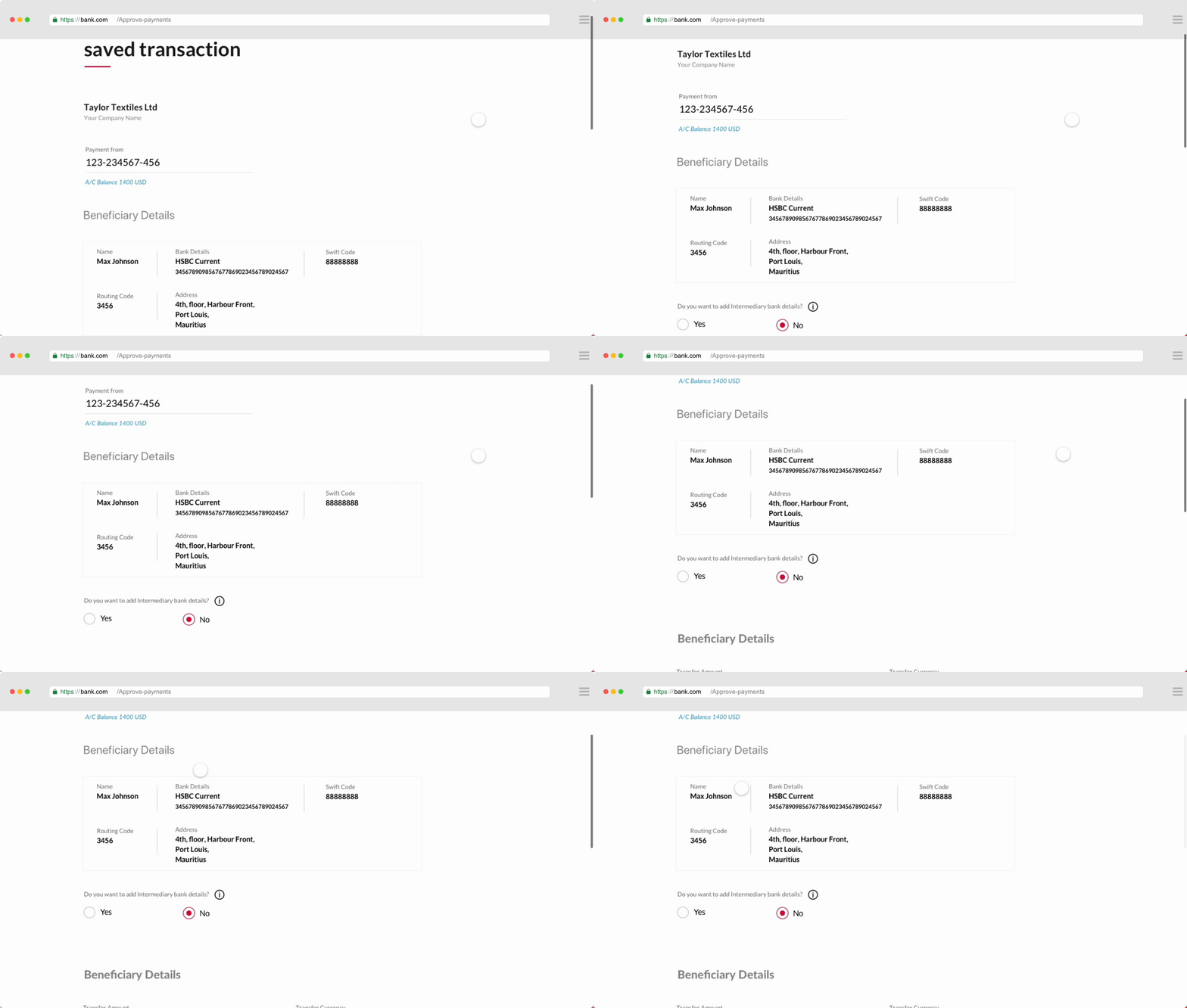
Smith says “ I expect the system to save the details of the beneficiary and show it to me when I repeat a transaction to the same beneficiary next time”
Solution
Beneficiary details will be autofilled when initiating a transfer to an existing beneficiary.
Scenario 3
Authenticating the Transfer with a Soft token code
Problem
“ I often forget to carry my hard token device with me, in such cases it gets difficult to authenticate the transfer”
Solution
We incorporated a new feature called“Soft Token” which would eliminate the need of carrying the hard token device around.

Scenario 4
Post-initiation of transfer
Problem
“ I do not have visibility on the status of the approvals for the transactions”
Solution
A reference number will be generated at the end of every request making it easier to track the initiated requests. Along with that they will receive notifications everytime an action is taken on the request by an approver.


Payment Initiator
Solution Proposed
How might we enable approvers to authorize payments
on the go?
4. Design Exploration
Designing the payments approval mobile app
The goal of the mobile application was to provide detailed information of the payments to be approved.
Other secondary goals, were
-
Keep a check on the account summary
-
Check the transaction status dashboard
-
Check Notifications

5. Visual Design
Scenario 1
Approving or Rejecting Transactions
Problem
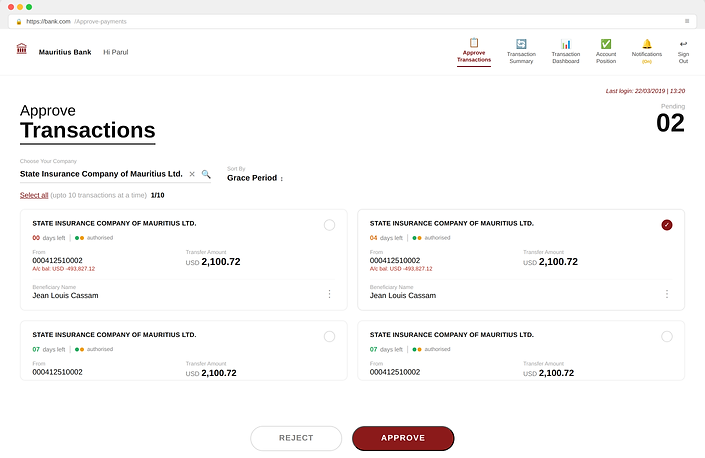
“ I am constantly travelling & it gets difficult to access my laptop everytime”
Solution
We created a new mobile application to approve/reject transactions on the go

Scenario 2
Approving OR Rejecting Transactions
Problem
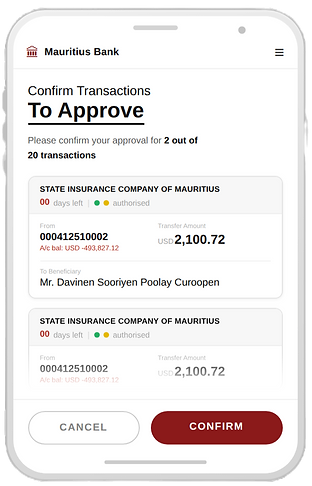
“ There are about more than 50 transactions per day to look at, its very time consuming to give an action on each separately”
Solution
We built the capability to be able to bulk select
transactions

Scenario 3
Transaction Dashboard
Problem
“I do not have visibility on the status of the transactions once they are approved”
Solution
We designed a Transaction Dashboard, where the approver can have a look at the status of all transactions whether they are in-process, successful or unsuccessful.


Scenario 4
Checking Account Balances
Problem
“ I am unable to keep a check on the money going out”
Solution
Account Position would give a detailed view about the balances in each account of the company.

_edited.png)
When things go wrong!!
We envisioned & designed for scenarios where customers might find themselves hitting a roadblock with situations like the system being down or the session getting expired which would cause frustration.

Challenges & How I Overcame Them
Designing Complex Corporate Payment Approvals for Mobile
Corporate payment approvals involve large amounts, compliance checks, and multiple data points such as beneficiary details, currency, amount, and approval status. Translating this complex information-heavy workflow from desktop banking to a small mobile screen was a major design challenge.
Issues faced:
-
Corporate payment transactions contain a lot of critical financial information, which is difficult to display clearly on mobile screens.
-
Payment approvers (often senior executives) needed to review and approve transactions quickly while traveling.
-
The experience had to remain secure and compliant, while still being simple and fast.
-
The legacy system was not designed to be responsive, which limited certain design approaches.
How I addressed it:
-
Prioritized key transaction information so approvers could quickly review essential details.
-
Designed clear card-based layouts and progressive disclosure to show more information only when needed.
-
Simplified the approval flow to reduce steps and cognitive load.
-
Worked closely with developers to ensure the mobile designs were technically feasible within system constraints.
Limited Access to Corporate Users
Since this was a B2B banking product, direct access to end users was restricted due to privacy and compliance regulations.
How I addressed it: I relied on a combination of analytics data, support tickets, and feedback collected by product managers and sales teams. I also conducted remote Zoom interviews with a small group of corporate users and observed product demos and sales calls to understand real workflows and pain points.
Legacy System Limitations
The existing corporate banking platform was built on legacy infrastructure, which limited modern UI capabilities and integrations.
How I addressed it: I worked closely with developers and product managers to understand technical constraints early. Designs were iterated frequently to ensure they were feasible within the current architecture, while still improving usability and workflow efficiency.
Outcome
-
89% of transactions were automated, significantly reducing the need for manual processing and improving operational efficiency.
-
Faster approval cycles were achieved through mobile-based approvals, allowing corporate users to review and approve payments anytime and anywhere.
-
Improved workflow efficiency with bulk approvals and autofill, reducing repetitive tasks and saving time for users managing multiple transactions.
-
Reduction in manual errors due to improved form validation, structured inputs, and simplified payment workflows.
-
20% increase in new Internet Banking customers within one year, indicating stronger adoption of the bank’s digital channels after the mobile app launch.
Key-Takeaways
What I learnt...
-
Collaboration & Communication is key
-
While technical limitations challenged me with limited design explorations, but it was an opportunity to design within the given constraints
-
Cross-functional team & having empathy for team members
-
Be an advocate for the user, but also understand the business & tech needs